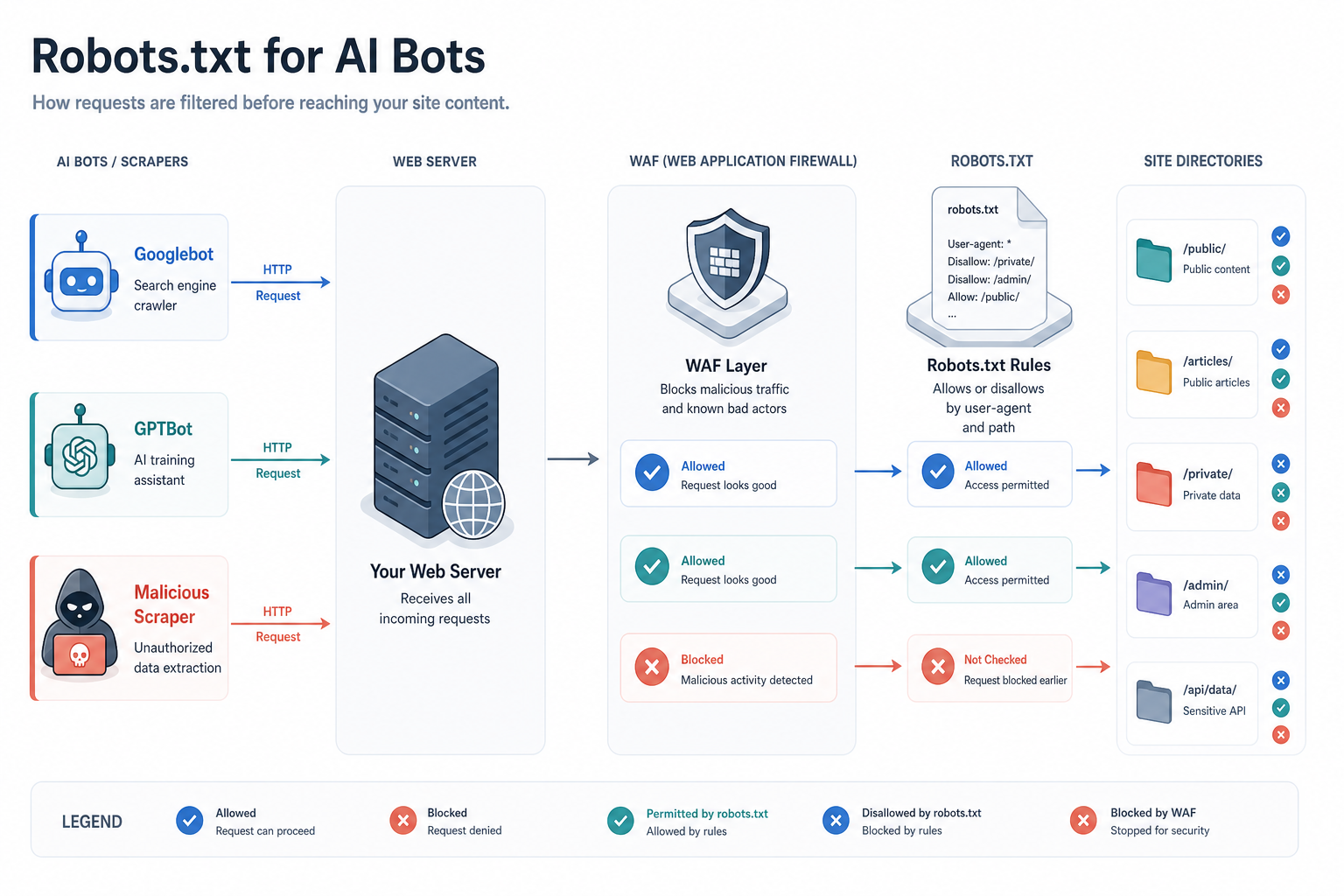
Introduction to AI Bot Management
In the era of AI-driven search and Answer Engine Optimisation (AEO), the role of robots.txt has evolved from a simple indexing tool into a critical strategic asset. While traditional SEO focused on Googlebot and Bingbot, the modern practitioner must now manage a diverse ecosystem of AI agents, including GPTBot (OpenAI), ClaudeBot (Anthropic), and PerplexityBot. This lesson provides a technical framework for configuring your root directory to control how LLM (Large Language Model) developers access your data.
Controlling AI bots is not merely about blocking or allowing; it is about selective visibility. As an AI Visibility Practitioner, your goal is to ensure that your high-quality, branded content is accessible for training and real-time retrieval while protecting sensitive data, proprietary tools, and low-value thin content that could dilute your brand's representation in AI outputs.
Understanding the Major AI Crawlers
Unlike standard search bots that crawl to index web pages for a results list, AI bots generally fall into two categories: training crawlers and real-time search agents.
1. GPTBot and OAI-SearchBot (OpenAI)
OpenAI uses GPTBot to gather data for training its future models (like GPT-5). More recently, they introduced OAI-SearchBot, which is used specifically for real-time search features in ChatGPT. Disallowing GPTBot prevents your data from being used in future model training, but it does not necessarily stop ChatGPT from citing your site if it uses a third-party search API.
2. ClaudeBot (Anthropic)
Anthropic’s crawler follows standard robots.txt protocols. Claude is known for high-quality reasoning, and ensuring it has access to your white papers and documentation can improve the accuracy of its mentions regarding your brand.
3. PerplexityBot (Perplexity AI)
Perplexity operates differently. It often acts as an aggregator, using its own bot alongside others. Because Perplexity is an answer engine, blocking PerplexityBot can lead to an immediate drop in AI-driven referral traffic.
4. CCBot (Common Crawl)
While not an AI company itself, the Common Crawl dataset is the primary source for many open-source and proprietary LLMs. If you want to opt-out of the broader AI ecosystem, CCBot is often your first target.
Technical Implementation
To manage these bots, you must use the standard User-agent and Disallow (or Allow) directives in your robots.txt file located at the root of your domain.
The 'All-In' Strategy
If your goal is maximum visibility in AI answers, you should explicitly allow these bots. This signals to the crawlers that your content is open for processing.
User-agent: GPTBot
Allow: /
User-agent: ClaudeBot
Allow: /
The 'Selective' Strategy
You may want AI to see your blog posts but not your technical documentation or customer support portal.
User-agent: GPTBot
Disallow: /private-api/
Disallow: /customer-data/
Allow: /blog/
Allow: /resources/
The Risks of Blind Blocking
Many publishers reacted to the AI boom by blocking all AI bots across the board. This is a high-risk strategy for an AI Visibility Practitioner. By blocking AI crawlers, you risk:
- Hallucination vulnerability: If an LLM cannot access your factual data, it is more likely to rely on outdated or third-party information to describe your brand.
- Zero visibility: Search engines like Perplexity or SearchGPT will be unable to provide links to your site, cutting off a growing source of traffic.
- Training exclusion: Future models will not 'know' about your unique propositions or latest innovations.
Worked Example: A B2B SaaS Site
Imagine a SaaS company, 'CloudFlow', that wants to be mentioned in AI comparisons of project management tools but needs to protect its proprietary knowledge base that is for logged-in users only.
Step 1: Audit the current file. The current file only mentions Googlebot. We need to add specific AI instructions.
Step 2: Define permissions.
We want OpenAI and Anthropic to see our public landing pages and blog. We want to block them from our /app/ directory and our /temp-testing/ folders.
Step 3: Draft the code.
User-agent: GPTBot
Disallow: /app/
Disallow: /temp-testing/
User-agent: ClaudeBot
Disallow: /app/
Disallow: /temp-testing/
User-agent: PerplexityBot
Disallow: /temp-testing/
Step 4: Validation. Use a robots.txt validator tool to ensure the logic doesn't accidentally block Googlebot from the blog, as some legacy systems handle multiple User-agent blocks poorly.
Dealing with 'Scrapers' vs. 'Official Bots'
Be aware that not all AI data collection happens via official bots identified in robots.txt. Some smaller LLM projects use generic scrapers that impersonate standard browsers. For these, robots.txt is ineffective. In such cases, your toolkit should expand to include:
- X-Robots-Tag: Using HTTP headers to serve
noindexspecifically to certain user agents. - WAF Rules: Using a Web Application Firewall (like Cloudflare) to block known AI scraper IP ranges.
Putting it into Practice
To apply this in a professional client engagement:
- Conduct an AI Crawler Audit: Check your server logs to see which AI bots are currently visiting your site and how frequently.
- Align with Content Strategy: Determine which sections of the site represent the 'Source of Truth' for the brand and ensure these are fully accessible to
GPTBotandClaudeBot. - Update Robots.txt: Implement a tiered robots.txt that distinguishes between conventional search bots (Google/Bing) and AI training bots.
- Monitor Referrals: Watch your analytics for traffic from
openai.comorperplexity.ai. If traffic drops after a robots.txt change, you may have been too restrictive. - Review Quarterly: AI companies frequently change their bot names. Stay updated on new entrants like
Applebot-Extendedwhich controls data usage for Apple's Intelligence features.