How AI Crawlers Discover Content

Master the technical pathways AI crawlers use to discover, fetch, and process content for Large Language Models and Generative Search engines.

12 min read
Foundations

Introduction

For content to appear inside a generative AI response—whether via ChatGPT, Perplexity, or Google’s Search Generative Experience (SGE)—it must first be discovered. While traditional SEO focuses on the Googlebot crawl, the AI ecosystem involves a diverse range of ‘agents’ with different behaviours, frequencies, and prioritisation logic. This lesson breaks down the technical journey from a server request to an AI index, providing practitioners with the knowledge to ensure their content is accessible to both traditional bots and the specific crawlers powering the next generation of discovery.

The Three-Stage Path: Access, Extraction, and Latency

AI systems do not 'read' the live web in real-time for every query. Instead, they follow a path similar to traditional search engines but with different end-goals and constraints.

1. Discovery and Fetching

Discovery begins with the URL. AI agents like OAI-SearchBot (OpenAI) or CCBot (Common Crawl) identify new or updated URLs through sitemaps, RSS feeds, and existing links.

  • User-Agent Identification: Each bot identifies itself in the server logs. For example, OpenAI uses GPTBot for general training data and OAI-SearchBot for real-time search functionality.
  • Crawl Budget in the AI Era: Unlike Google, which crawls to index the whole web, some AI agents are highly selective, prioritising high-authority 'seed' sites or content linked within social media feeds.

2. Rendering and Extraction

Once a bot fetches the HTML, it must parse it. Modern AI crawlers increasingly use headless browsers to render JavaScript. If your content is hidden behind a ‘Load More’ button or requires complex client-side interaction, an AI crawler may fail to extract the primary text.

3. Vectorisation and Indexing

This is the critical difference between SEO and AEO (Answer Engine Optimisation). Once the text is extracted, it is broken into 'chunks' and converted into high-dimensional vectors. This process allows the AI to understand the semantic meaning of your content rather than just keyword matches.

Leading AI Crawlers to Know

To manage visibility, you must recognise the major players in your server logs:

  1. GPTBot (OpenAI): The general crawler for training future iterations of GPT models.
  2. OAI-SearchBot (OpenAI): Used specifically for real-time search within ChatGPT (Search).
  3. ClaudeBot (Anthropic): Crawls content for the Claude family of models.
  4. Google-InspectionTool: Used by Google to power SGE/AI Overviews and traditional Search.
  5. PerplexityBot: The crawler for the Perplexity search engine, often relying on high-frequency refreshes of news and data sites.
  6. CCBot: The Common Crawl bot. Many open-source models (like Llama) are trained on the Common Crawl dataset.

The Role of Common Crawl and Third-Party Data

Many practitioners make the mistake of only looking at direct crawlers. However, a significant portion of AI 'knowledge' comes from curated datasets. Common Crawl is a non-profit that crawls the web and provides its data for free. If your site is blocked from CCBot, you may effectively disappear from dozens of smaller, niche AI models that cannot afford their own massive crawling infrastructure.

Case Study: The 'Hidden Content' Problem

Consider a financial news site that uses a sophisticated JavaScript framework to load its graphs and data summaries.

  • The Issue: The site’s text was visible to Googlebot (which is very good at rendering JS), but when users asked ChatGPT for a summary of the site's latest report, the AI claimed it couldn't find the data.
  • The Discovery: Upon checking server logs, the team found that OAI-SearchBot was hitting the page but timing out before the JavaScript execution completed.
  • The Fix: The site implemented Server-Side Rendering (SSR) for the summary text. Within 48 hours, ChatGPT's real-time search was able to accurately cite and summarise the data.

Impact of Robots.txt and Permissions

Robots.txt remains the primary tool for controlling AI discovery, but it is a blunt instrument.

  • Disallowing GPTBot: This prevents your content from being used to train future OpenAI models.
  • Disallowing OAI-SearchBot: This prevents your content from being surfaced as a source/citation in ChatGPT Search.

Practitioners must decide: do you want to be part of the 'answer' (citation) even if you don't want to be part of the 'brain' (training)?

Technical Barriers to AI Discovery

Several factors can impede an AI bot's ability to ingest your content:

  1. Paywalls: Most AI crawlers will not bypass a paywall. If your primary value is behind a gate, it won't appear in AI summaries unless you provide a 'leaky' paywall for specific User-Agents.
  2. IP Blocking/CDN Challenges: Over-aggressive Cloudflare or Akamai settings can mistakenly flag AI bots as malicious scrapers.
  3. Fragmented URL Structures: AI bots prefer clean, hierarchical structures. Excessive parameters in URLs can lead to 'infinite spaces' that confuse crawlers.
  4. Poor Semantic HTML: If you use <div> tags for everything instead of <article>, <section>, and <aside>, the AI may struggle to distinguish your main content from sidebar noise.

Putting it into Practice

To ensure your content is discoverable for AI systems, follow these steps:

  1. Audit Your Logs: Use your server logs or a tool like Screaming Frog to identify which AI bots are currently visiting your site.
  2. Check for CCBot: Ensure you are not inadvertently blocking Common Crawl, as this is the 'fountain' for many LLMs.
  3. Optimise Load Speed: AI bots have limited 'patience' (dwell time) per page. Use lightweight HTML to ensure fast extraction.
  4. Implement Schema Markup: While not a 'discovery' tool per se, Schema provides a structured map that helps the crawler understand what it has found, increasing the likelihood of an accurate index.
  5. Validate via API: Use tools like the OpenAI API to 'test' how a model perceives a specific URL's content to ensure the extraction is clean.

By treating AI crawlers as a distinct class of visitor with unique requirements, you can ensure your content moves from the 'unseen web' into the heart of generative AI responses.

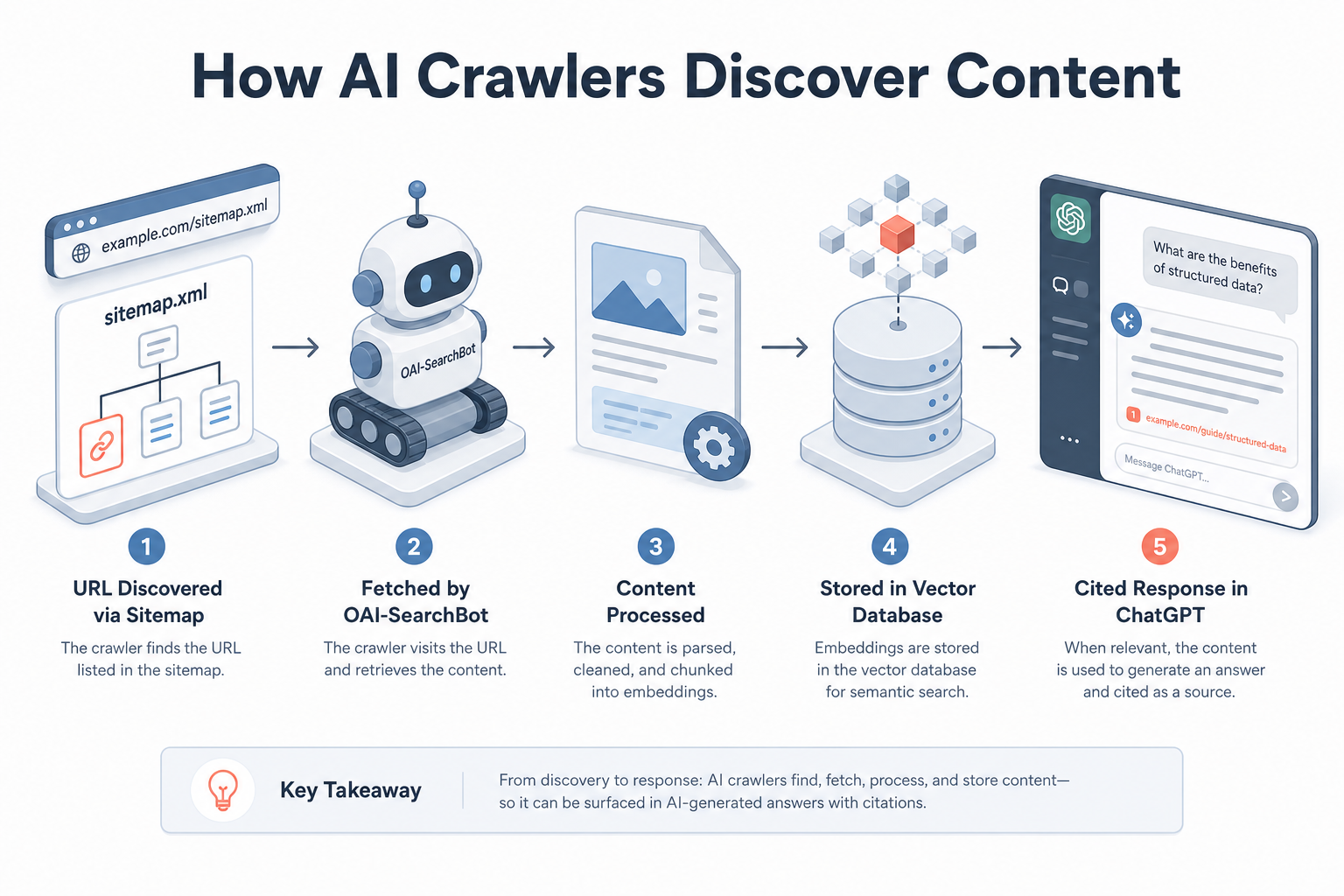
Visual diagram

[ diagram placeholder ]

A flowchart showing a URL being discovered via a sitemap, fetched by OAI-SearchBot, processed through a vector database, and finally appearing as a cited response in a ChatGPT interface.

Exercise

Examine your website's robots.txt file. Identify if you have specific directives for 'GPTBot' or 'CCBot'. Search your server logs for 'OAI-SearchBot' to see if OpenAI's search crawler has visited your site in the last 30 days.

Key takeaways

  • AI discovery follows a three-stage path: discovery/fetching, rendering/extraction, and vectorisation.
  • Different bots serve different purposes: GPTBot is for training, while OAI-SearchBot is for real-time search citations.
  • Common Crawl (CCBot) is a vital secondary path for content to enter open-source and niche AI models.
  • Robots.txt can be used to selectively allow real-time search while blocking model training.
  • JavaScript-heavy sites often face 'extraction failure' even if they are indexed by Googlebot.
  • AI bots prioritise high-authority 'seed' sites and frequently updated content feeds.
  • Server-Side Rendering (SSR) is the safest way to ensure AI crawlers see your primary content.
  • Paywalls and aggressive CDN settings are common technical barriers to AI discovery.
  • Semantic HTML helps AI crawlers distinguish between primary content and navigation/ads.
  • Regular log file analysis is essential to monitor how AI agents are interacting with your infrastructure.

Lesson Quiz

Pass at 70%.

1. Which bot is specifically used by OpenAI for real-time search functionality in ChatGPT?
2. Why is CCBot (Common Crawl) important for AI visibility?
3. What is 'vectorisation' in the context of AI indexing?
4. Which of these is a likely result of blocking 'GPTBot' in robots.txt?
5. How do AI agents typically handle content hidden behind JavaScript 'read more' buttons?
6. What is the primary risk of an aggressive CDN/WAF for AI visibility?
7. What role does Semantic HTML (like <article>) play in AI discovery?
8. If a site has a hard paywall, what is the most likely outcome for AI bots?
9. What is 'Crawl Budget' in the context of AI?
10. Which technology is recommended to ensure AI crawlers see JavaScript-rendered content reliably?
Create a free account to save progress and earn a certificate.