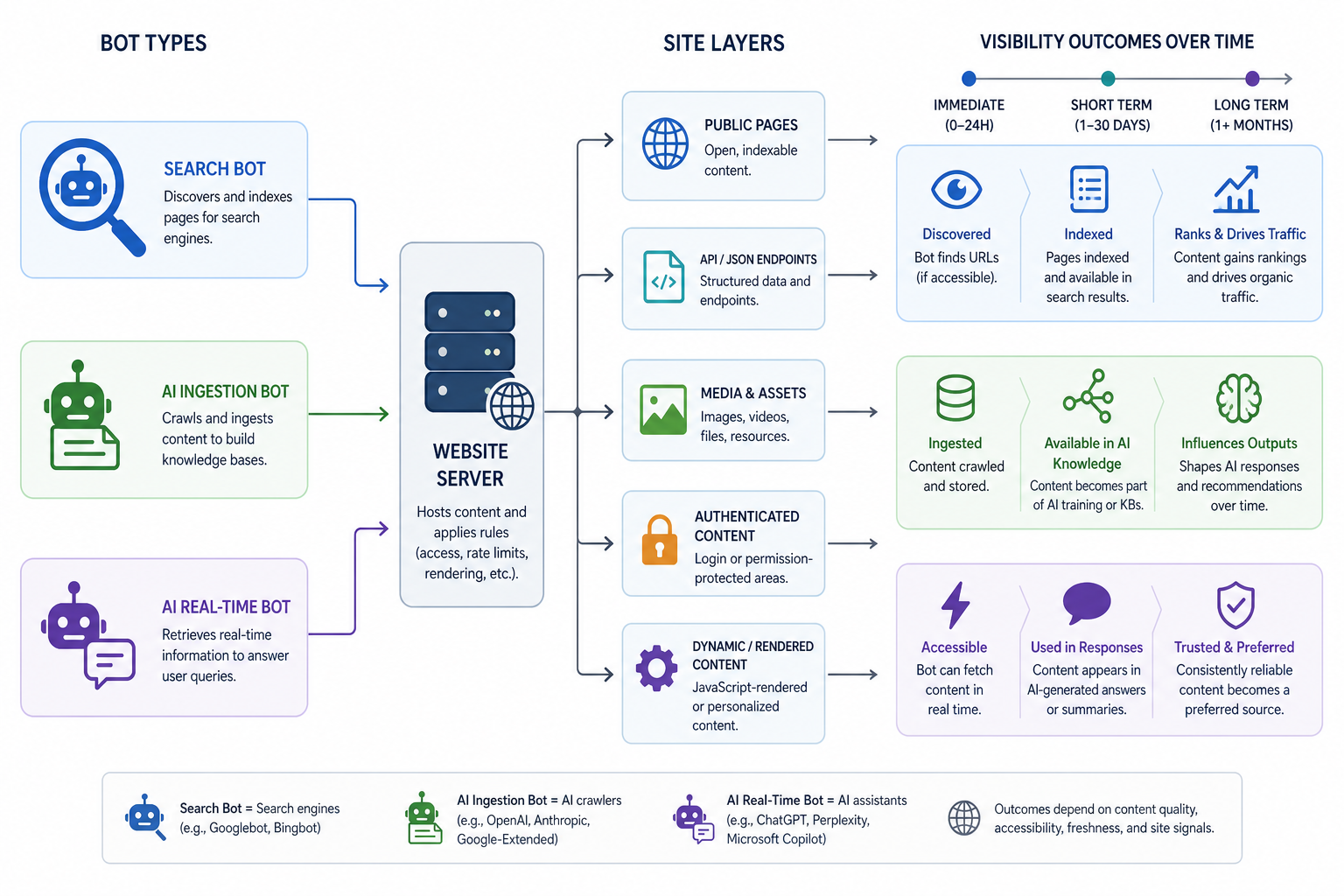
Introduction to AI Bot Monitoring
In the era of AI-driven search and generative engines, waiting for third-party rank trackers to show positions is a reactive strategy. To be proactive, an AI Visibility Practitioner must look at the source: server logs. When AI companies like OpenAI, Anthropic, or Perplexity refresh their knowledge bases, they crawl the web. By monitoring these crawls in real-time or near-real-time, you gain a leading indicator of when your content is being 'ingested' and integrated into LLM responses. This lesson covers how to identify these bots, distinguish them from legacy search crawlers, and use this data to forecast visibility gains.
Identifying Key AI Agents
The landscape of AI bots is evolving rapidly. Unlike generic scrapers, official AI bots usually identify themselves via the User-Agent string. Your first task is to configure your log analysis tool (like ELK Stack, Splunk, or Screaming Frog Log File Analyser) to isolate these specific strings.
Primary AI User-Agents to Track
- GPTBot (OpenAI): The primary crawler for ChatGPT. It respects robots.txt but is highly active on high-authority sites.
- ChatGPT-User (OpenAI): Used when a user triggers a real-time web search within ChatGPT. This indicates active 'live' interest in your content.
- ClaudeBot (Anthropic): The crawler for Anthropic’s Claude models. It tends to be more polite in crawl frequency but very thorough in content depth.
- PerplexityBot (Perplexity AI): A hybrid bot that often accompanies searches. Monitoring this helps understand if your site is being used as a primary source for Perplexity's 'Sources' citations.
- CCBot (Common Crawl): While not specific to one company, Common Crawl data is the foundation for almost all open-source LLMs (Llama, Mistral). High activity here suggests your data will be in the next generation of various models.
- Google-Other: Often used for various AI-related tasks outside of traditional search indexing. While less specific, spikes here often precede AI Overview updates.
Analyzing Crawl Patterns as Leading Indicators
Search engines like Google crawl frequently to maintain an index. AI bots often crawl in 'bursts' or in response to specific triggers. You should look for two distinct types of activity:
1. The High-Volume Ingestion Phase
When an AI provider is retraining a model or updating a large-scale RAG (Retrieval-Augmented Generation) index, you will see a massive spike in hits from bots like GPTBot across your entire architecture. If you see this followed by a drop-off, it typically means your content has been 'mapped'. Within 2-4 weeks, you should expect to see your key talking points appearing in LLM answers.
2. The Real-Time Verification Phase
Bots like 'ChatGPT-User' indicate that an actual human is asking a question that requires your site to answer. Tracking the URLs accessed by these agents provides a direct map of what users are currently asking AI about your niche. If a specific product page is being hit by 'ChatGPT-User' 50 times a day, but your 'AI Visibility' in third-party tools is low, it means the AI is reading your site but perhaps not citing it clearly yet.
Practical Log Analysis Workflow
To move from data to insight, follow this technical workflow:
- Filter by User-Agent: Isolate the strings mentioned above. Eliminate known 'spoofers' by checking IP addresses against the published ranges of OpenAI or Anthropic (often hosted on AWS or GCP).
- Map Crawl Depth to Content Clusters: Determine which sections of your site are being prioritised. Are AI bots spending more time on your documentation or your blog? If they ignore your conversion pages, your internal linking may be failing to guide them.
- Correlate with 'Last Modified' Headers: AI bots are efficient. They often use
If-Modified-Sincerequests. If you see many304 Not Modifiedresponses, the AI already knows your content. If you see200 OKfollowed by a surge in traffic, your new content has successfully triggered a re-ingestion. - Identify 'Friction Points': Look for
403 Forbiddenor429 Too Many Requestserrors specific to AI bots. If your firewall is accidentally blocking GPTBot but allowing Googlebot, you are effectively invisible to ChatGPT.
Worked Example: The Software Provider Case
Imagine a SaaS client launches a new 'AI Security' feature.
- Day 1-7: Search console shows Googlebot crawling. No AI bot activity.
- Day 8: GPTBot hits the 'Security' sub-folder 400 times in 2 hours.
- Analysis: The practitioner notes this in the weekly report. This is a leading indicator. The content is now likely in the OpenAI 'Buffer'.
- Day 12: ChatGPT-User begins hitting the pricing page specific to that feature.
- Insight: Users are already asking ChatGPT about pricing for this new feature.
- Action: The practitioner checks ChatGPT's output. The AI is giving the correct price but lacks detail on 'Enterprise' scaling. The practitioner updates the site content to be more 'scannable' for AI agents.
- Result: By Day 20, the AI output is richer and more accurate.
Putting it into Practice
To begin monitoring AI bot activity on a client site, do the following:
- Check Robots.txt: Ensure you aren't inadvertently blocking
GPTBot,ClaudeBot, orPerplexityBot. Many legacy security plugins block these by default. - Set up Log Alerts: In your server environment (e.g., Cloudflare Logpush or AWS S3 logs), set up an alert for when the string "GPTBot" appears more than 100 times in an hour.
- Audit Redirects: Ensure your site uses permanent 301 redirects. AI bots are often less patient than Googlebot with long redirect chains and may drop the crawl if they hit more than two hops.
- Validate IPs: Periodically run a DNS lookup on IP addresses claiming to be AI bots to ensure they are the legitimate agents and not speculative scrapers using the name to bypass rate limits.