Alerting on Visibility Changes

Develop a rigorous notification framework to detect AI citation shifts, model-specific ranking drops, and technical barriers preventing LLM indexing before they impact traffic.

12 min read
Foundations

Introduction to AI Visibility Alerting

Unlike traditional SEO monitoring, which primarily focuses on keyword rankings and organic traffic from Google, AI Visibility monitoring requires a more nuanced approach. In the era of Generative Search Experience (SGE) and AI Overviews, a simple drop in a SERP position may not tell the full story. You may still rank #1, but if an AI model synthesises your Content without citing you—or worse, cites a competitor for a claim you originated—your performance metrics will collapse. Building an effective alerting system for AI visibility is about catching regressions in citation frequency, brand sentiment within LLM responses, and technical accessibility issues that prevent models from scraping your latest data.

The Three Pillars of AI Alerts

To build a comprehensive monitoring system, we categorise alerts into three distinct pillars: Access, Authority, and Attribution.

1. Access and Crawlability Alerts

Before an AI model can cite your content, it must be able to parse it. Traditional SEO tools monitor Googlebot, but an AI Visibility Practitioner must monitor specialized user-agents like GPTBot, OAI-SearchBot, and CCBot (Common Crawl).

Thresholds for Alerting:

  • Robots.txt changes: Immediate alert if 'Disallow' rules are added that affect AI bots while intending to only block bad actors.
  • 4xx/5xx spikes for AI Bots: Monitoring server logs specifically for when LLM scrapers are being rate-limited or blocked by a Web Application Firewall (WAF).
  • Schema.org markup errors: Using automated scripts to validate that Speakable or ClaimReview schema remains intact during site deployments.

2. Authority and Sentiment Alerts

AI models are trained on consensus and authoritative signals. If the 'sentiment' or 'context' of your brand name changes within a model's training set or RAG (Retrieval-Augmented Generation) pipeline, your visibility will suffer.

Thresholds for Alerting:

  • Brand Association Shift: Alerts based on weekly API pulls from models (like GPT-4o or Claude) asking 'What are the top three providers for [Service]?' if your brand name disappears from the top three.
  • Sentiment Drift: Monitoring for an increase in negative adjectives associated with your brand in LLM outputs compared to your baseline.

3. Attribution and Citation Alerts

This is the most critical area for the practitioner. You need to know when your specific data points are being used without a backlink or citation.

Thresholds for Alerting:

  • Citation Share Drop: If you previously held a citation for 40% of 'how-to' queries in your niche and that drops to 20%.
  • Competitor Leapfrogging: An alert when a competitor who was previously uncited begins appearing in AI Overviews for your primary high-value keywords.

Setting Up an Automated Monitoring Stack

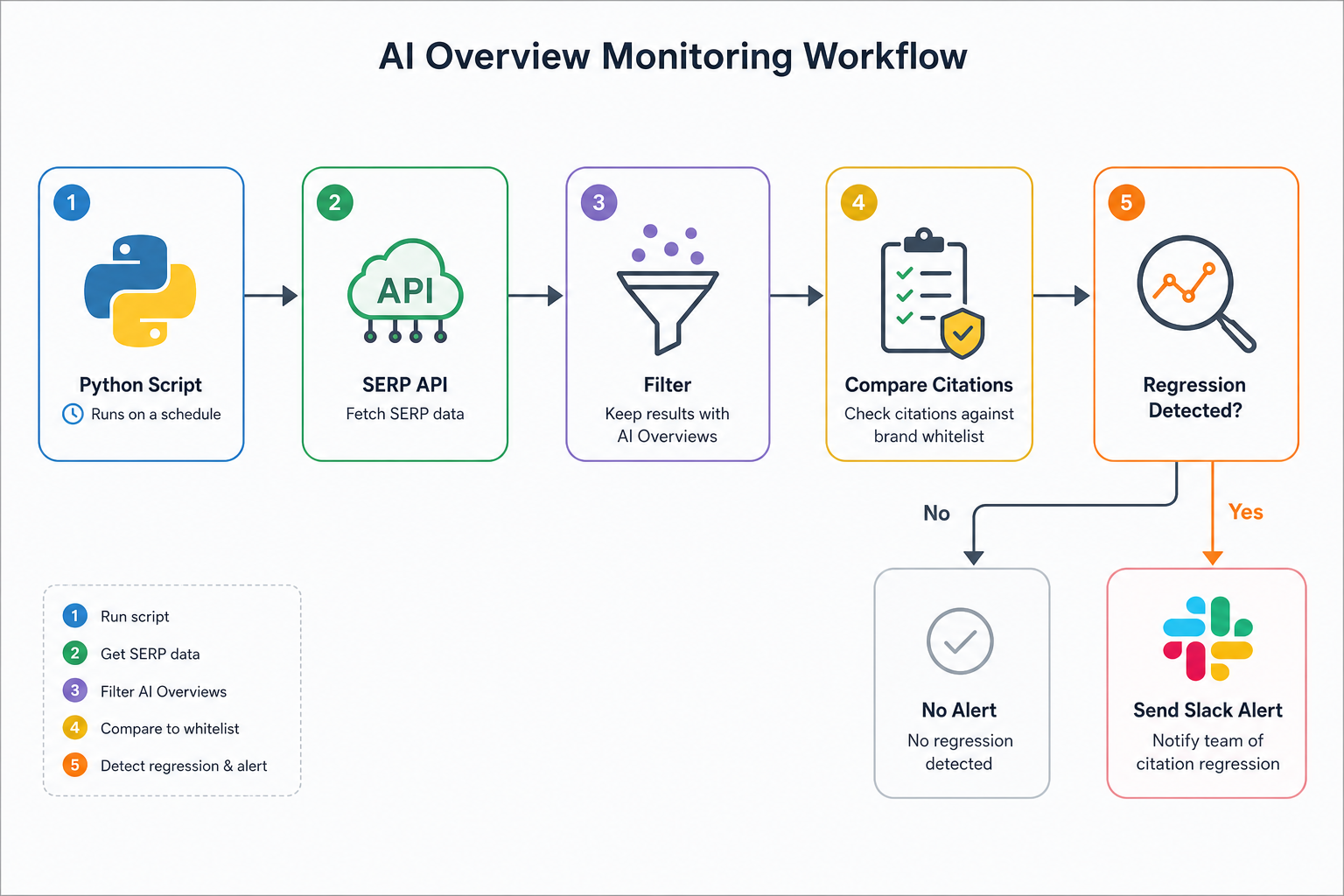
You do not need to manually check Perplexity every morning. An effective system utilises a combination of API-driven checks and scraping tools. Here is a step-by-step logic for a custom Python-based alert script:

  1. Keyword Selection: Identify 50-100 'High Intent' queries where AI Overviews are prevalent.
  2. API Integration: Use a tool like Serper.dev, DataForSEO, or BrightData to pull the Google Search result, specifically capturing the 'AI Overview' (SGE) block.
  3. Parsing Logic: Extract the links and domains cited within the AI citations.
  4. Comparison Logic: Compare the current citation list against a 'Master List' of your URLs stored in a SQL database or Google Sheet.
  5. Trigger: If your URL is missing from an AI Overview where it was present 24 hours ago, trigger a Slack or Email notification with the query and the new competitor's URL.

Worked Example: The 'Price Drop' Anomaly

Imagine you manage a large UK-based electronics retailer. You have an alert set up for the query 'best mid-range noise cancelling headphones'.

  • Monday: Your product page for the 'Sony WH-XB910N' is cited as the 'Best Value' choice in the AI Overview.
  • Tuesday: The alert triggers. You have been dropped from the AI citation list.
  • Investigation: You check the log. A competitor updated their product page with a lower price and a new 'Buy Now' schema. The AI model updated its response to favour the cheaper, newer-crawled data point.
  • Response: You adjust the pricing or update your content to emphasize a different factor (e.g., 'Free 3-year warranty') to regain the citation for a different attribute.

Managing False Positives

LLMs are stochastic, meaning they can produce different results for the same prompt. A common mistake is setting alerts too sensitive. If you alert on every single change in wording, you will suffer from 'alert fatigue'.

Refinement Strategies:

  • N-of-M Rule: Only trigger an alert if a citation is missing in 3 out of 5 consecutive checks over 12 hours.
  • Clustering: Group keywords by topic. Only alert if visibility drops across a 'cluster' (e.g., all 'iPhone repairs' keywords), rather than a single rogue query variation.

Putting it into Practice

  1. Audit your crawl logs: Identify which AI bots are currently visiting your site and at what frequency (GPTBot should be a priority).
  2. Select your 'Pilot 20': Choose 20 keywords that currently trigger an AI Overview where you are cited.
  3. Automate the check: Use a tool like Nightwatch or a custom script to monitor the 'AI Citation' field for these 20 keywords daily.
  4. Set the Slack Trigger: Connect your monitoring tool to a dedicated Slack channel (#ai-visibility-alerts) so the team can react to regressions in real-time.
  5. Bi-Weekly Review: Review all triggered alerts every two weeks to identify patterns. Are you losing citations to the same competitor? Does it happen after every site deploy?

Visual diagram

[ diagram placeholder ]

A workflow diagram showing a Python script pulling data from a SERP API, filtering for AI Overviews, comparing citations against a brand whitelist, and sending a Slack alert if a regression is detected.

Exercise

Identify 5 keywords where your site (or a client site) currently appears in an AI Overview/SGE result. Create a simple spreadsheet to track whether the site remains in those AI citations daily for one week, noting any changes in the competitors cited alongside you.

Key takeaways

  • AI Visibility alerts must monitor Access, Authority, and Attribution patterns.
  • Monitor specific AI user-agents like GPTBot and OAI-SearchBot in your server logs.
  • Citation drops are often lead indicators of organic traffic decline.
  • Use API-driven tools to scrape AI Overviews rather than manual spot-checking.
  • The 'N-of-M' rule helps reduce false positive alerts from stochastic LLM outputs.
  • Technical shifts, such as changes in Schema.org, can cause immediate citation loss.
  • Competitor monitoring is vital; an alert should trigger when a competitor enters an AI slot you held.
  • Sentiment monitoring in LLM responses ensures your brand is being described accurately.
  • Rate-limiting AI crawlers unintentionally is a common cause of visibility regressions.
  • Alerting systems should be integrated into Slack or Teams for rapid response.

Lesson Quiz

Pass at 70%.

1. Which user-agent is primarily used by OpenAI to crawl for future model training?
2. Why is it important to monitor AI citations differently than standard blue-link rankings?
3. What does the 'N-of-M' rule help prevent in an alerting system?
4. Which technical feature can help an AI model verify the 'claims' made in your content?
5. If your brand sentiment in LLM outputs turns negative, which pillar of visibility is affected?
6. What is the primary risk of blocking all AI bots in robots.txt?
7. A 'Citation Share' metric measures what?
8. Which tool would be most appropriate for automating AI visibility checks at scale?
9. What should be the immediate reaction to a '4xx' error spike from AI scrapers in logs?
10. In the worked example, why did the retailer lose their ‘Best Value’ citation?
Create a free account to save progress and earn a certificate.