Auditing Technical Discoverability

Master the technical essentials of AI bot accessibility, focusing on robots.txt configurations, schema validation, and rendering efficiency for LLM crawlers.

12 min read
Foundations

Introduction to Technical Discoverability for AI

In the era of Generative Engine Optimisation (GEO), technical SEO has evolved beyond preparing pages for traditional search engines like Google or Bing. We now must ensure our content is architecturally sound for Large Language Model (LLM) agents and AI crawlers such as GPTBot, Claude-Bot, and OAI-SearchBot. Technical discoverability refers to the ability of these specific agents to crawl, render, and extract structured meaning from your web pages without friction. If an AI bot cannot parse your site efficiently, your brand will not appear in AI-generated summaries, even if your content is high quality.

The AI Crawler Landscape

Traditional SEOs are accustomed to managing Googlebot, but the AI landscape is more fragmented. Auditing technical discoverability requires a shift in how we view robots.txt and server-side logs. Current major AI agents include:

  • GPTBot (OpenAI): The primary crawler for data used to train future GPT models.
  • OAI-SearchBot (OpenAI): Specifically used for real-time search features in ChatGPT.
  • Claude-Bot (Anthropic): Crawls for the Claude ecosystem.
  • PerplexityBot: An aggregator that often uses headless browsing to fetch real-time data for citations.
  • CommonCrawl: A massive open-source dataset that many smaller AI companies use for training.

Auditing Robots.txt and Agent Permissions

The first step in a technical AI audit is reviewing the robots.txt file. You must decide whether to allow 'Training' (historical data) vs. 'Search/Inference' (real-time citation).

Example Audit Checklist:

  1. Check for User-agent: * Disallow: /. This blocks all bots, including AI.
  2. Look for specific AI blocks. Does your site block GPTBot but expect to be cited in ChatGPT? (Note: OpenAI now uses OAI-SearchBot for real-time citations, which respects different rules than the training bot).
  3. Ensure your XML sitemaps are listed clearly. AI bots use these to prioritise fresh content just as Googlebot does.

JavaScript Rendering and AI Consumption

A significant hurdle for AI visibility is the use of heavy client-side JavaScript (JS). Many AI crawlers, particularly those focused on speed and data volume, may struggle with pages that require complex execution to reveal content.

When auditing, use a 'View Source' vs. 'Inspect Element' comparison. If the core information (the 'answer' to a user's potential query) is not in the initial HTML source, you are at risk. For AI visibility, Server-Side Rendering (SSR) or Static Site Generation (SSG) is the gold standard. If you must use client-side rendering, ensure that your 'App Shell' includes the critical text data required for AI synthesis.

Schema.org: The Language of Machines

While Google uses Schema for Rich Snippets, AI engines use it to build a knowledge graph of your entities. An AI audit must validate that your JSON-LD is not just present, but semantically dense.

The 'Semantic Gap' Audit

If your page discusses a 'Project Management Software', but your Schema only identifies it as a 'Product', you are leaving a semantic gap.

  • Specific Types: Use SoftwareApplication rather than just Thing.
  • Properties: Fill out featureList, applicationCategory, and operatingSystem.
  • Links: Use sameAs to link your entities to established data nodes like Wikipedia or Wikidata. This helps the AI triangulate your authority.

Performance and Fragmented Content

AI bots are often more resource-constrained than Google's multi-billion dollar crawling infrastructure. If your server is slow (high Time to First Byte), or if your content is fragmented across dozens of micro-requests, an AI agent may time out or only scrape a partial version of your page.

Auditing the 'Text-to-HTML' ratio remains relevant here. A page with 1MB of code and only 200 words of text is 'noisy' for a transformer model. Aim for clean, semantic HTML5 tags (<article>, <section>, <aside>) which provide structural cues to the LLM about what content is primary and what is decorative.

Worked Example: Auditing a SaaS Landing Page

Let's audit 'CloudFlow', a hypothetical HR software site.

  1. Robots.txt: We find Disallow: /api/. This is fine, but we see User-agent: CCBot Disallow: /. This blocks CommonCrawl. If CloudFlow wants to be part of future training sets, this should be removed.
  2. Rendering: The pricing table is loaded via a third-party JS widget. When we disable JS, the pricing (a key data point for AI comparison) disappears. Recommendation: Move pricing data into the static HTML or use a fallback <noscript> tag.
  3. Schema: The site uses Organization schema. However, it lacks FAQPage schema. Since AI's frequently pull from FAQs, this is a missed opportunity. Recommendation: Implement FAQPage schema for the 'Common Questions' section to increase the chance of appearing in ChatGPT 'Search' results.
  4. Header Headers: The page uses <div> tags styled as headers. Recommendation: Convert these to proper <h1> through <h3> tags to provide a clear hierarchical map for LLM chunking.

Putting it into Practice

To begin your technical AI audit, follow these steps:

  1. Map your Bots: Create a spreadsheet of the agents you currently allow vs. block. Use your server logs to see if GPTBot or PerplexityBot are actually visiting.
  2. Test Without JS: Use a browser extension to disable JavaScript and browse your 'Money Pages'. If the primary value proposition is gone, the AI likely can't see it either.
  3. Validate Schema Depth: Use the Schema Markup Validator. Don't just look for errors; look for 'thinness'. Add at least three more descriptive properties to your primary entities.
  4. Monitor Search Console: Keep an eye on the 'Crawl Stats' report. Look for increases in 'Other' bot types, which often represent the growing tail of AI search agents.
  5. Audit Navigation: Ensure your most important content is within two clicks of the homepage. AI bots, like search bots, have a 'crawl budget' and won't hunt for buried content deep in a complex architecture.

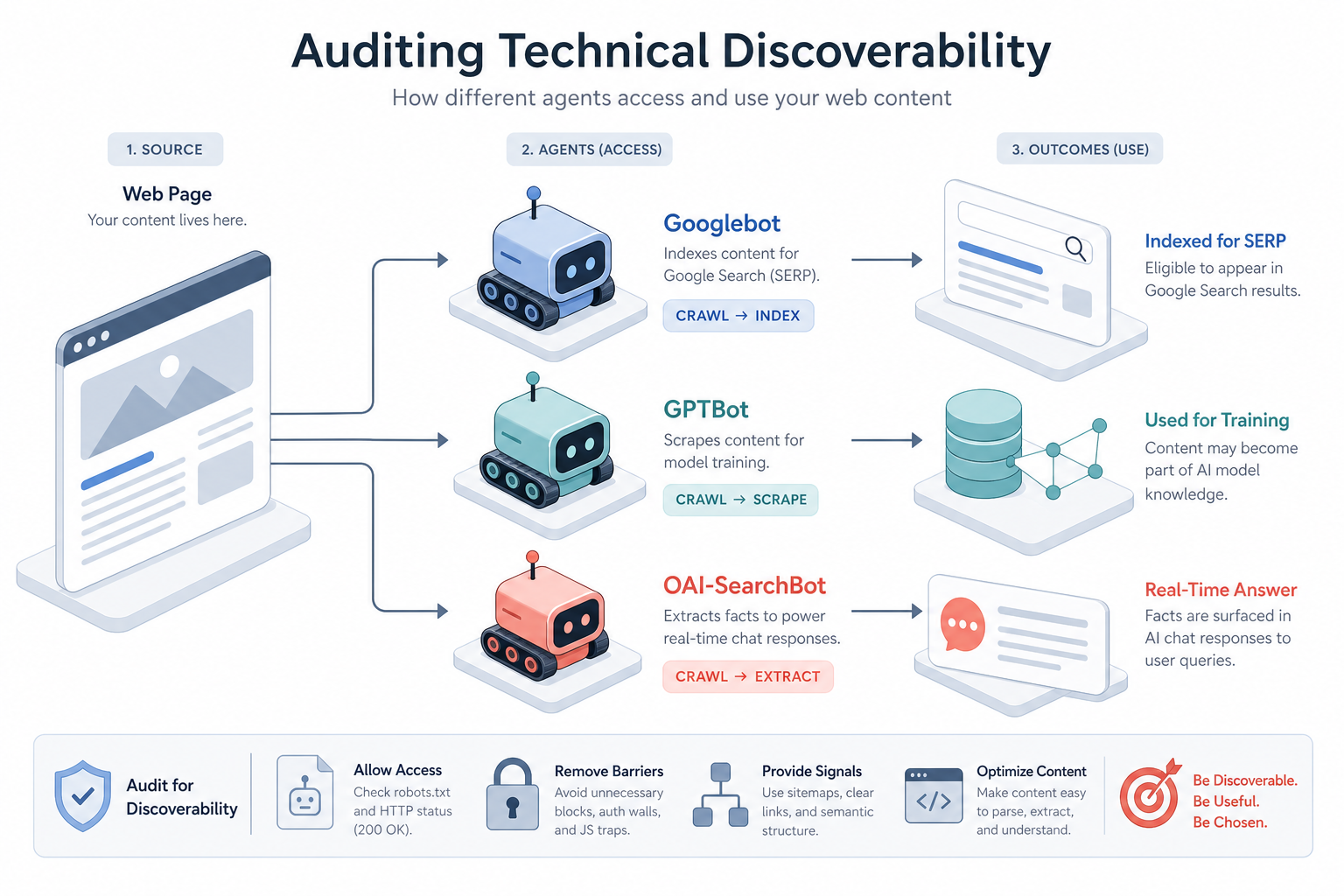
Visual diagram

[ diagram placeholder ]

A flowchart showing a web page being processed by three different agents: Googlebot (indexing for SERP), GPTBot (scraping for training), and OAI-SearchBot (extracting facts for a real-time chat response).

Exercise

Identify a key service page on your website. Use a 'User Agent Switcher' extension to view the page as 'Googlebot' and then disable JavaScript entirely. Document which pieces of information are missing and determine if those are 'critical facts' that an AI needs to answer a user's query.

Key takeaways

  • AI visibility requires sites to be accessible to specific User-Agents like GPTBot and OAI-SearchBot.
  • The robots.txt file is the first line of defence/access; ensure you aren't accidentally blocking LLM crawlers.
  • OpenAI uses OAI-SearchBot specifically for its real-time 'Search' features in ChatGPT.
  • Server-Side Rendering (SSR) is preferred over Client-Side Rendering (CSR) for reliable AI extraction.
  • Schema.org markup should be semantically dense, using specific types rather than generic ones.
  • The use of 'sameAs' in JSON-LD helps AI models connect your brand to the global knowledge graph.
  • Clean HTML5 semantic structure helps LLMs identify the primary content for chunking and synthesis.
  • AI bots have crawl budgets; fast Time to First Byte (TTFB) and efficient site architecture are essential.
  • Fragmented content or data hidden behind UI elements (like accordions) may be missed by some AI crawlers.
  • A technical AI audit isn't just about errors; it's about reducing 'noise' for machine consumers.

Lesson Quiz

Pass at 70%.

1. Which OpenAI bot is specifically used for the real-time search functionality within ChatGPT?
2. If your content is only visible after JavaScript execution, what is the primary risk for AI visibility?
3. What is the benefit of using 'sameAs' in your JSON-LD schema for AI visibility?
4. Why is 'Semantic HTML' (e.g., <article>, <nav>) important for AI engines?
5. In a robots.txt file, what does 'User-agent: *' apply to?
6. Which of these is a common 'AI Crawler' used for building large-scale open-source datasets?
7. If a site's Time to First Byte (TTFB) is very high, how might an AI bot react?
8. Which schema type would be MOST helpful for an AI trying to compare software features?
9. What is the main drawback of blocking 'GPTBot' while allowing 'OAI-SearchBot'?
10. A technical AI audit reveals that critical text is hidden behind a 'Click to Expand' accordion that uses JavaScript. What is the best recommendation?
Create a free account to save progress and earn a certificate.