Building a Visibility Dashboard

Master the art of synthesising AI-driven metrics and traditional SEO data into a cohesive dashboard that demonstrates tangible value to stakeholders and clients.

12 min read
Foundations

Introduction to AI Visibility Measurement

In the era of Answer Engine Optimisation (AEO) and Generative Experience Optimisation (GEO), traditional rank tracking is no longer sufficient. Clients need to see how their brand appears in ChatGPT's Search, Google Search Generative Experience (SGE), Perplexity, and Claude. A visibility dashboard acts as the bridge between technical execution and business value. This lesson covers how to architect a dashboard that moves beyond simple 'rankings' to measure influence, sentiment, and share of voice across the AI landscape.

The Three Pillars of a Visibility Dashboard

A professional visibility dashboard for 2024 and beyond must balance three distinct data categories:

  1. Traditional Performance Metrics: These provide the baseline. You still need clicks, impressions, and CTR from Google Search Console (GSC), but they now serve as the foundation rather than the entire story.
  2. AI-driven Sentiment and Citations: This measures how LLMs perceive your brand. Are you the 'cheapest' option or the 'most reliable'? How often are you cited as a primary source?
  3. Generative Share of Voice (gSoV): This is a calculated metric that measures your brand's presence in AI responses for a specific set of intent-based queries compared to your competitors.

Selecting Your Technical Stack

Building an effective dashboard requires a robust data pipeline. You cannot rely on manual copy-pasting for client-level reporting. Your stack should ideally include:

  • Data Sources: Google Search Console API, Bing Webmaster Tools, and third-party AI tracking tools (e.g., Authoritas, Keyword.com, or custom Python scripts querying LLM APIs).
  • Middleware: Tools like Supermetrics, Looker Studio Connectors, or a simple BigQuery instance to normalise data.
  • Visualisation: Looker Studio (formerly Data Studio) remains the industry standard for accessibility, though Power BI is preferred for deeper enterprise integration.

Step-by-Step Dashboard Construction

Step 1: Mapping the Query Clusters

Begin by categorising your target keywords into 'Informational', 'Commercial', and 'Brand' clusters. AI engines respond differently to these. For example, a 'How-to' query is more likely to trigger a generative summary than a 'Buy now' query. Your dashboard should allow clients to filter visibility by these clusters.

Step 2: Defining 'Source Citations'

In an AI-generated response, being blue-linked in the 'Sources' section is the new Page 1. You must track:

  • Primary Citation Rate: How often your URL is the first link provided.
  • Snippet Presence: Whether your content is being directly quoted in the generative block.

Step 3: Sentiment Tracking

Use an LLM (via API) to run a sentiment analysis on the results for your top 50 brand keywords. Does the AI describe your service as 'innovative' or 'expensive'? Visualise this using a word cloud or a sentiment score (0-100).

Worked Example: 'EcoStore Packaging' Dashboard

Imagine you are reporting for a B2B client, 'EcoStore', selling sustainable bubble wrap.

The Objective: Prove that their focus on 'Biodegradable standards' is winning them citations in AI answers.

The Setup:

  • We track 100 keywords related to 'compostable packaging'.
  • We use a script to query ChatGPT and Perplexity once a week for these terms.

Current Dashboard View:

  • AI Share of Voice: EcoStore holds 22% of citations across the cluster, 5% more than their biggest competitor.
  • Sentiment Radar: The AI consistently associates EcoStore with 'European Certification', a key USP.
  • GSC Impact: We show that despite a 5% drop in traditional blue-link clicks, the 'Brand Search' volume has increased by 12%, suggesting that AI visibility is driving users to search for the brand directly.

Critical Visualisations to Include

  • The Visibility Funnel: A chart showing total queries -> generative responses triggered -> brand mentioned -> click-through (if available).
  • Competitor Benchmarking: A simple bar chart comparing your citation frequency against three top competitors.
  • Contextual Sentiment Heatmap: A map showing which topics the AI trusts you for (e.g., 'technical specs') versus where it ignores you (e.g., 'pricing comparison').

Avoiding Dashboard Bloat

One common mistake is including every possible metric. This leads to 'data fatigue'. To avoid this, follow the 80/20 rule: 80% of the dashboard should focus on the metrics that drive the client's specific business KPIs (usually revenue or leads), while 20% explores the 'why' behind the numbers.

Putting it into Practice

To move from theory to application, follow these steps this week:

  1. Identify the top 20 queries that drive the most value for your client.
  2. Manually check these 20 queries in Google Gemini and Perplexity. Record if the brand is cited.
  3. Create a single-page Looker Studio report that compares this 'Manually Sampled AI Visibility' with the traditional GSC 'Average Position' for those same 20 keywords.
  4. Present this to your client to demonstrate the 'visibility gap'—where they rank well but aren't being cited, or vice versa.

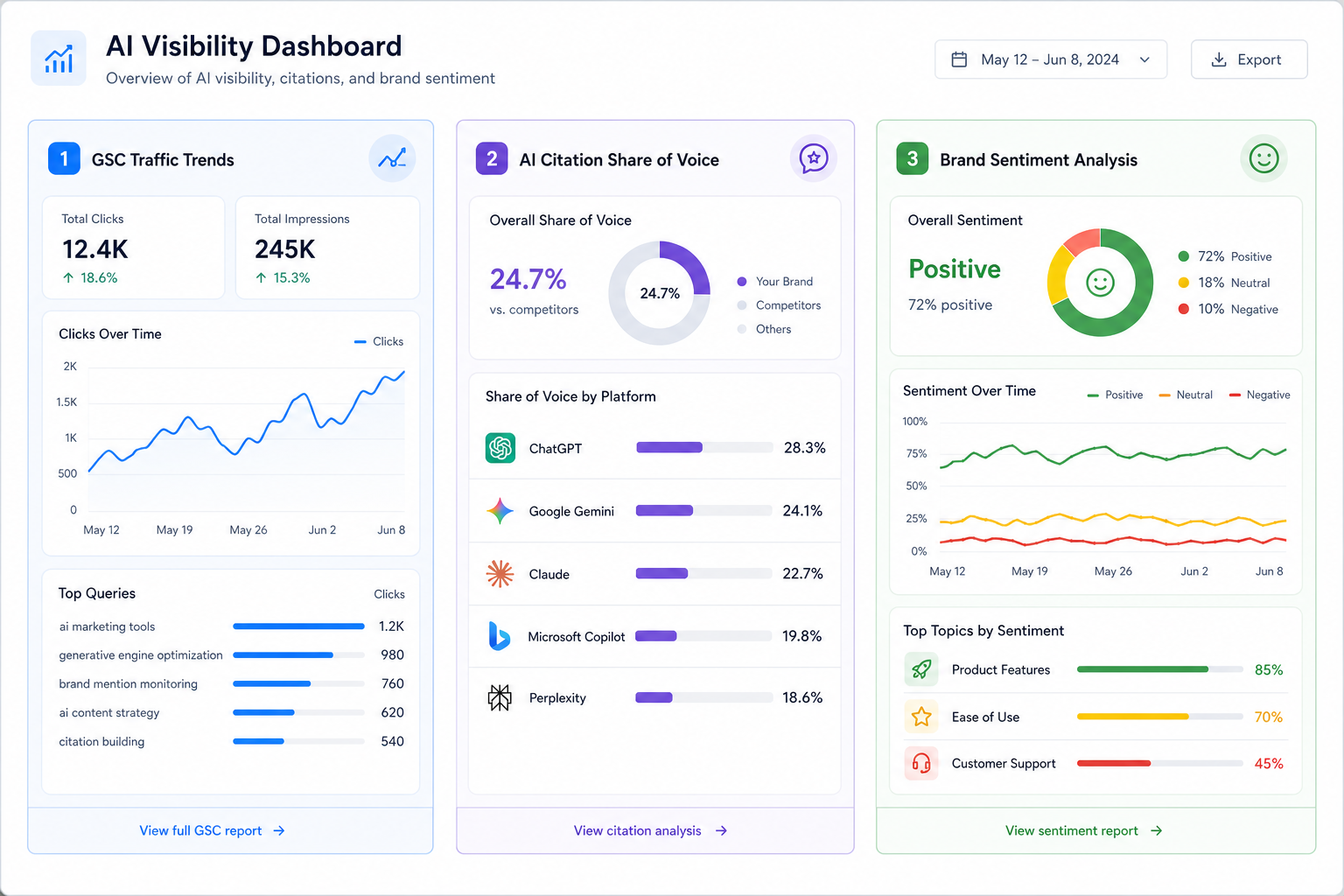
Visual diagram

[ diagram placeholder ]

A dashboard mockup showing a three-column layout: Left column for GSC traffic trends, Middle for AI Citation Share of Voice by platform, and Right for Brand Sentiment analysis.

Exercise

Select 10 high-value keywords for your site. Create a spreadsheet tracking whether your site is cited by Perplexity, Gemini, and ChatGPT for these terms. Visualise the result in a simple bar chart showing 'Mention Frequency' vs 'Competitor Mention Frequency'.

Key takeaways

  • A visibility dashboard must bridge traditional SEO and generative AI metrics.
  • Generative Share of Voice (gSoV) is a vital metric for tracking brand authority.
  • Citations in AI responses are the 'new Page 1' for visibility practitioners.
  • Sentiment analysis of AI output helps understand brand perception, not just volume.
  • Distinguish between informational and commercial query performance in AI engines.
  • Use data connectors like BigQuery or Supermetrics to automate data flows.
  • Looker Studio is recommended for visualising AI visibility for most UK clients.
  • Avoid dashboard bloat by focusing on metrics that correlate with business revenue.
  • Always benchmark against competitors to provide necessary context for AI mentions.
  • AI visibility can drive increased brand search volume even when blue-link clicks fluctuate.

Lesson Quiz

Pass at 70%.

1. What is the primary purpose of a visibility dashboard in the AI era?
2. What does 'gSoV' stand for in this context?
3. Why should you categorise keywords into clusters for AI reporting?
4. Which tool is cited as the industry standard for accessibility in visualising SEO data?
5. In an AI response, what is considered the 'new Page 1'?
6. What is 'Dashboard Bloat'?
7. How can sentiment tracking benefit a brand?
8. What is a recommended 'Middleware' for data normalisation?
9. If traditional clicks decrease but brand search volume increases, what might this indicate?
10. What does the 80/20 rule refer to in dashboard design?
Create a free account to save progress and earn a certificate.