Verifying AI Bot Access

Master the technical methods for confirming AI crawler access through server log analysis, User-Agent verification, and real-time probe testing to ensure content reaches LLM training sets.

12 min read
Foundations

Introduction

Before content can be surfaced in an AI-generated response or a Generative Engine Optimization (GEO) result, the underlying AI bot must be able to crawl and ingest the data. While most SEO practitioners are familiar with Googlebot, the ecosystem for AI visibility involves a distinct set of crawlers with different behaviors, IP ranges, and retry cadences. If your robots.txt or server-side firewall (WAF) is inadvertently blocking these agents, your visibility efforts are void. This lesson provides a technical framework for verifying that AI bots can reach your content using server logs and live probes.

The AI Agent Landscape

AI bots typically fall into two categories: scrapers for training data (e.g., GPTBot) and real-time search agents (e.g., Bingbot or OAI-Search). To verify access, you must first identify the specific agents relevant to your visibility strategy.

Primary AI Agents to Monitor

  1. GPTBot (OpenAI): Used to crawl the web for information to train future models. It respects robots.txt but is often blocked by default in some hosting environments.
  2. OAI-SearchBot: Used specifically by search features in ChatGPT to find real-time information. It is more time-sensitive than the general GPTBot.
  3. ClaudeBot (Anthropic): The crawler for Anthropic’s Claude models.
  4. Google-Extended: This is not a bot itself, but a token in robots.txt that allows/disallows Google from using your site content to improve Gemini and Vertex AI.
  5. PerplexityBot: The crawler for the Perplexity AI search engine, which often identifies as a specialized agent or leverages third-party scrapers.

Method 1: Analyzing Server Logs

Server logs provide the only definitive proof that an AI bot has successfully reached your server. Unlike client-side analytics (such as Google Analytics), server logs record every request, including those that don't execute JavaScript.

Identification via User-Agent

Filter your access logs for strings identifying AI agents. For example, using a grep command on a Linux server:

grep "GPTBot" /var/log/apache2/access.log

Interpreting HTTP Status Codes

  • 200 OK: The bot successfully accessed the page.
  • 403 Forbidden: The bot is being blocked by a firewall, WAF (like Cloudflare), or robots.txt.
  • 429 Too Many Requests: Your server is rate-limiting the bot, which may lead to incomplete indexing.
  • 304 Not Modified: The bot checked the content, but since it hasn't changed, it didn't re-download it (this is good for crawl budget).

Verifying IP Legitimacy

Malicious actors often spoof AI bot User-Agents. To confirm a request is genuinely from OpenAI, for example, you should perform a reverse DNS lookup or compare the IP address against OpenAI's publicly published IP ranges (found in their official documentation).

Method 2: Live Probing and Tools

Waiting for a crawler to hit your site can be inefficient. Live probing allows you to test the response in real-time.

Using cURL for Spoofing

You can simulate an AI bot request from your command line to see how your server responds. This reveals if your server treats AI bots differently than standard browsers.

curl -I -A "Mozilla/5.0 AppleWebKit/537.36 (KHTML, like Gecko; compatible; GPTBot/1.2; +https://openai.com/gptbot)" https://yourdomain.com/target-page

If the response is a 403, your server-level security or CDN is likely blocking the agent.

Technical SEO Tooling

Tools like Screaming Frog allow you to set a custom User-Agent. By setting the User-Agent to "GPTBot," you can crawl your own site to identify which specific pages are inaccessible due to internal linking issues or technical errors.

Worked Example: Investigating a Visibility Drop

Scenario: A client’s product comparisons stopped appearing in ChatGPT search results after a migration to a new security provider.

  1. Step 1: Log Review. We checked the logs for "OAI-SearchBot." We found zero entries for the last 48 hours.
  2. Step 2: WAF Inspection. We checked the Cloudflare firewall events. We found thousands of blocked requests tagged as "AI Scrapers and Crawlers."
  3. Step 3: Verification. We used a cURL probe with the GPTBot User-Agent. The server returned a 403 error page generated by the firewall.
  4. Step 4: Resolution. We added the official OpenAI IP ranges to the WAF allow-list and updated the robots.txt to explicitly allow OAI-SearchBot.
  5. Step 5: Confirmation. Within 4 hours, server logs showed 200 OK status codes for OAI-SearchBot, and visibility began to recover.

Managing robots.txt for AI

Robots.txt remains the primary "handshake" between your site and AI agents. For intermediate practitioners, a simple Disallow: / is often too blunt.

Best Practice Configuration:

User-agent: GPTBot
Allow: /public-insights/
Disallow: /private-user-data/

User-agent: CCBot
Disallow: /

This configuration allows OpenAI to train on your valuable public data while blocking Common Crawl (CCBot) if you wish to limit broader scraping.

Putting it into Practice

  1. Audit your WAF: Check if your hosting provider (e.g., WP Engine, SiteGround) or CDN (Cloudflare, Akamai) has a "Block AI Bots" toggle turned on by default.
  2. Test 5 Core Pages: Use a cURL command or a User-Agent switcher browser extension to visit your top 5 revenue-generating pages maskeading as GPTBot.
  3. Establish a Log Baseline: Create a monthly report of AI bot hits to track whether your "AI crawl share" is increasing as you optimise content.
  4. Cross-Reference with Search Console: Ensure that while you allow AI bots, you aren't inadvertently causing crawl spikes that harm your site's performance for human users.

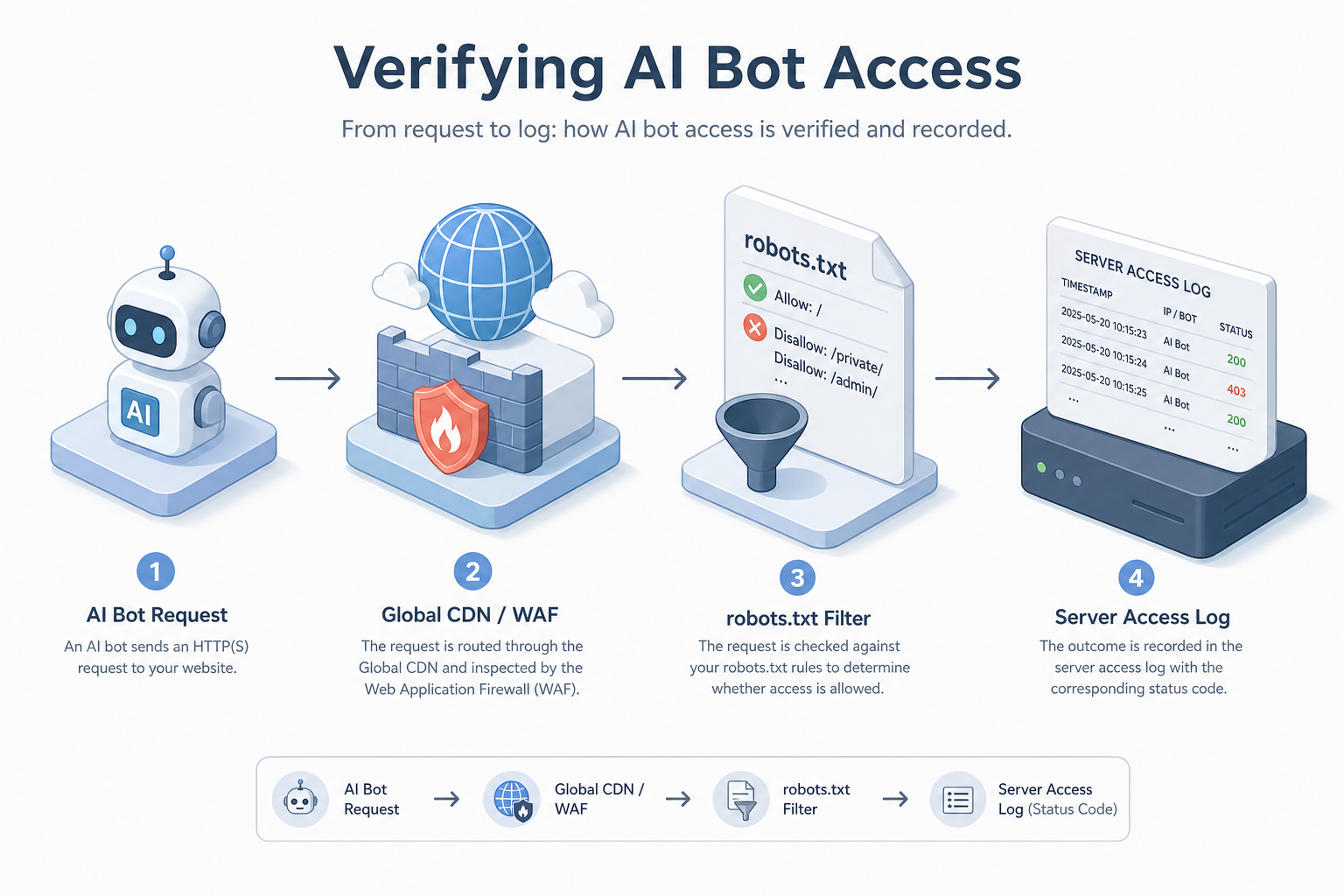
Visual diagram

[ diagram placeholder ]

A flowchart showing a request from an AI Bot hitting a Global CDN/WAF, passing through a robots.txt filter, and finally being recorded in a Server Access Log with a status code.

Exercise

Use a command-line tool or a browser extension to change your User-Agent to 'GPTBot'. Attempt to load your site's home page and a deep link. Record whether you receive a standard page load or a block/error message, then check your robots.txt to see if your access matches your current site permissions.

Key takeaways

  • AI bots are distinct from standard SEO crawlers and require specific monitoring.
  • Server logs are the only 'source of truth' for confirming bot access.
  • The 200 OK status code is the goal for all critical visibility content.
  • A 403 error often indicates a firewall or WAF blocking AI agents as 'bad bots'.
  • User-Agent spoofing with cURL is a fast way to test server responses.
  • Official IP ranges should be used to verify that bots are legitimate and not spoofed.
  • Google-Extended is a specific control for Gemini/Vertex AI, not a traditional bot.
  • GPTBot and OAI-SearchBot serve different functions (training vs. real-time search).
  • Robots.txt should be granularly configured to allow AI access to high-value pages.
  • Consistently monitoring bot access prevents 'visibility blackouts' during site updates.

Lesson Quiz

Pass at 70%.

1. Which server response code indicates that an AI bot is being actively blocked by your server or firewall?
2. Why shouldn't you rely solely on User-Agent strings for verifying AI bots in logs?
3. What is the primary function of the 'Google-Extended' token in robots.txt?
4. Which command-line tool is commonly used to manually 'probe' a URL with a specific User-Agent?
5. If you see a 429 status code in your logs specifically for GPTBot, what is the most likely issue?
6. Which bot is specifically used for OpenAI's real-time web search features?
7. Where is the first place you should check if you suspect a CDN is blocking AI bots?
8. What does a 304 Not Modified status code imply regarding your crawl budget?
9. Which of these is a major crawler for training data used by multiple AI companies?
10. What is the purpose of 'Allow' directives in robots.txt for AI bots?
Create a free account to save progress and earn a certificate.